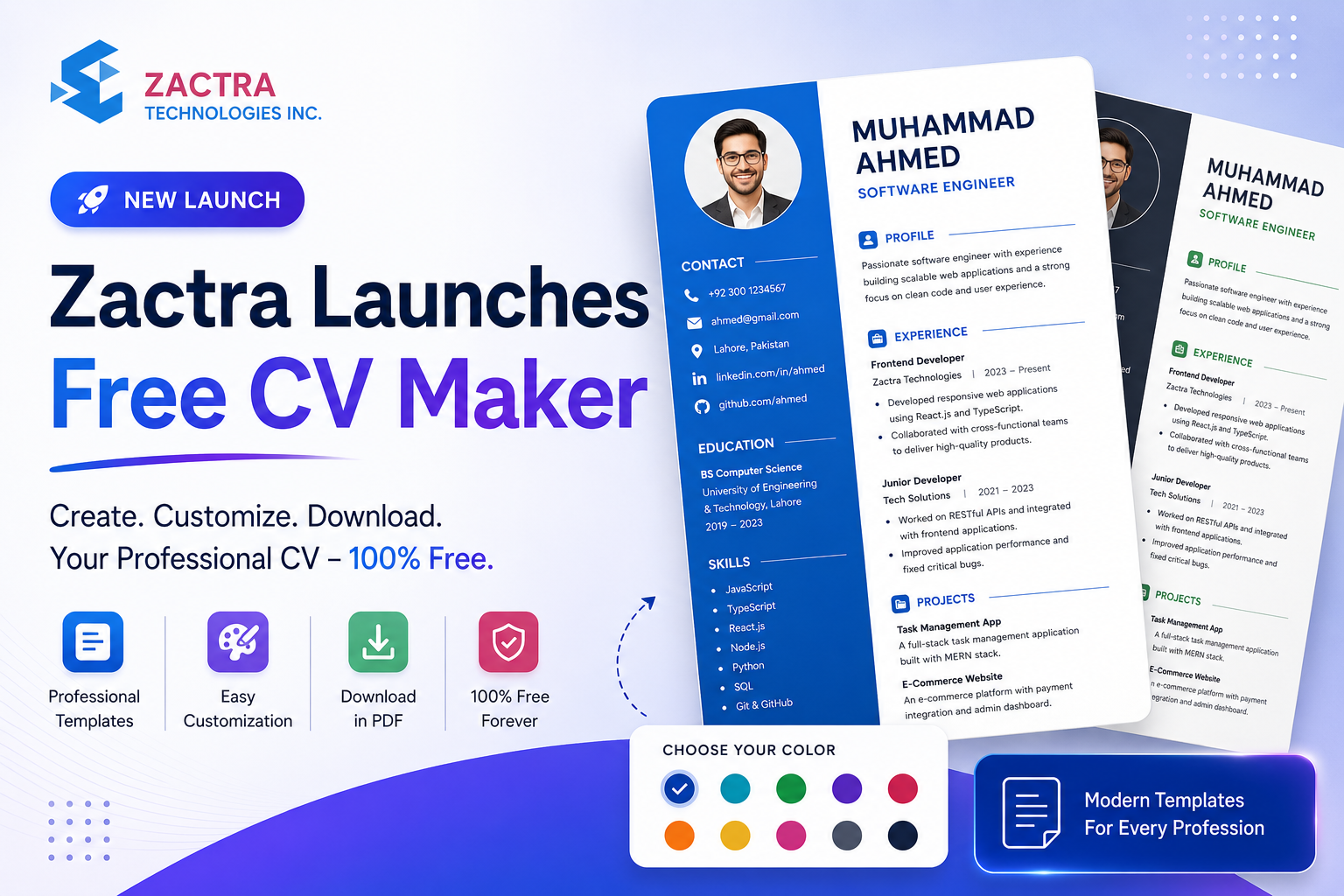
Free CV Maker Now Live
Zactra Launches a Free CV Maker for Creating Professional CVs Online
Create, customize, preview, and download a professional CV online
with Zactra’s easy-to-use Free CV Maker, complete with 50 templates,
flexible sections, live editing, and personalized color options.
Creating a professional CV should not require expensive design software,
complicated document formatting, or hours spent adjusting margins,
fonts, headings, and page spacing.
Yet many job seekers still build their CVs manually in word processors,
copy outdated formats from old documents, or struggle with templates
that are difficult to customize. A small change to one section can move
the entire layout, create inconsistent spacing, or leave important
information difficult to read.
This makes a simple career task unnecessarily difficult:
- Which CV layout is appropriate for a specific profession?
- How should experience, education, projects, and skills be organized?
- How can a CV be updated without breaking the design?
- What should a person with limited experience include?
- How can colors and typography be personalized professionally?
- How can the finished CV be saved as a clean PDF?
Zactra Free CV Maker provides a more practical approach.
It brings CV templates, structured content sections, live preview,
customization controls, rich-text editing, and PDF generation together
inside one connected browser-based experience.
The platform is live at
cv.zactra.com
.
Users can begin building a CV without creating an account. Registration
or sign-in is requested only when the user is ready to download and save
the completed CV.
What Is Zactra Free CV Maker?
Zactra Free CV Maker is an online CV-building platform created for job
seekers, students, graduates, professionals, freelancers, career
changers, and anyone who needs a polished CV without manually designing
every page.
The platform provides a structured editing dashboard where users can
choose a template, enter personal and professional information, add or
remove sections, customize colors, and review the final result through
an immediate visual preview.
In simple terms:
Zactra Free CV Maker turns your career information into a
professionally arranged CV while allowing you to control the
template, sections, wording, and visual style.
The CV builder is designed around a dynamic template system. This means
a template can define its own section order, field types, content
requirements, visual layout, and available options instead of forcing
every user into one universal form.
Users can explore the available designs on the
Zactra CV template gallery
and begin with the design that best matches their profession and
preferred style.
Why CV Creation Needs a Better System
A CV is one of the most frequently requested documents during a job
search, but creating one remains surprisingly difficult for many
applicants.
The challenge is not always a lack of qualifications. Often, the
difficulty comes from deciding what to include, how to organize it, and
how to present it in a clean format that a recruiter can review quickly.
Traditional editing tools focus on document formatting. A dedicated CV
maker can focus on the actual workflow: entering career information,
arranging sections, comparing templates, and producing a consistent
final document.
From Blank Page to Structured Career Story
Zactra Free CV Maker replaces an empty document with guided sections,
reusable entries, live design feedback, and professional templates
that help users focus on communicating their experience.
A better CV-building system should reduce formatting work without
removing personal control. It should help users organize information
while still allowing them to choose their preferred design, section
order, wording, and color style.
The Four Core Pillars of Zactra Free CV Maker
1. Easy CV Creation
The builder divides CV content into clear, collapsible sections.
Users can enter contact details, a professional summary, work
experience, education, skills, languages, projects, and other
relevant information without manually designing the document.
2. Real-Time Visual Feedback
The CV preview updates while the user types. This makes it easier to
understand how each sentence, section, and formatting choice will
appear in the finished document.
3. Flexible Template Personalization
Users can choose from 50 CV templates and personalize the selected
design with curated color palettes or custom theme, text, and paper
colors.
4. Convenient PDF Export
When the CV is complete, users can sign in or register and download
the document as a PDF suitable for job applications, email
attachments, and personal records.
Start Creating Without Registration
Zactra Free CV Maker does not place an account form between the user and
the CV editor.
Visitors can open the builder, choose a template, and begin entering
information immediately. This makes it possible to evaluate the editing
experience and preview the CV design before deciding to create an
account.
1
Open the CV builder without signing in.
2
Choose a template and enter your information.
3
Preview every change while you work.
4
Sign in only when you are ready to download.
Anonymous drafts can be retained in the browser, helping users continue
working without immediately creating an account. Browser storage can be
affected by private browsing, device changes, or clearing website data,
so important CVs should be downloaded or saved after sign-in.
Edit on One Side and Preview on the Other
The Zactra CV-building dashboard is designed around a side-by-side
workflow.
The editing area contains the template and content controls, while the
preview area displays the current CV. As the user types, adds an
experience entry, changes a heading, or selects a different color, the
preview updates without requiring a separate refresh.
This immediate feedback helps users identify long paragraphs, uneven
sections, missing details, and page-balance issues before downloading
the document.
Rich-Text Editing Where It Matters
Longer sections such as professional summaries, responsibilities,
achievements, and project descriptions can use rich-text controls
for clearer structure.
Formatting should remain purposeful. Short paragraphs, relevant
bullet points, and measurable achievements are generally easier to
review than dense blocks of text.
Choose From 50 Professional CV Templates
Different professions, career levels, and personal styles require
different CV presentations.
Zactra Free CV Maker currently provides 50 templates covering a range of
layouts, typography styles, content densities, sidebars, timelines,
headings, accent treatments, and professional categories.
Each template card displays a miniature preview generated from the same
CV renderer used in the full builder. This helps users understand the
structure before selecting a design.
| Template Direction |
Suitable For |
Typical Characteristics |
| Professional |
General corporate roles |
Clear headings, balanced spacing, structured experience |
| Executive |
Senior professionals and leaders |
Strong profile section, leadership focus, refined hierarchy |
| Technical |
Developers, engineers, and technical specialists |
Projects, tools, technical skills, concise experience |
| Creative |
Designers, marketers, and portfolio-driven roles |
Distinctive accents, visual hierarchy, project emphasis |
| Student and Graduate |
Early-career applicants |
Education, projects, coursework, skills, and activities |
Dynamic Sections for Different Careers
Not every CV needs exactly the same sections.
A software developer may need a detailed projects section. A graduate
may want to emphasize education, coursework, and activities. A senior
manager may need space for leadership achievements, while a multilingual
candidate may want a prominent language section.
Zactra Free CV Maker uses dynamic template definitions so individual
designs can request and display different information.
- Contact details
- Professional title
- Professional summary or profile
- Employment history
- Education and qualifications
- Professional and technical skills
- Languages
- Projects and portfolios
- Certifications and courses
- Achievements or other template-specific content
Repeatable sections allow users to add multiple positions, degrees,
projects, or languages. Entries can be removed or reordered when the
sequence needs to change.
Collapsible Editing Sections
Major content areas can be collapsed after completion, helping users
keep the editor organized while working through longer CVs with
multiple experience, education, or project entries.
Personalize Theme, Text, and Paper Colors
A professional CV does not need to look identical to every other CV
created from the same template.
Zactra Free CV Maker includes color preferences that allow users to
adjust the visual identity of a selected template while preserving its
structure.
Curated Color Palettes
Users can choose from prepared color combinations designed to work
with the selected template.
Custom Color Controls
Theme or accent colors, main text colors, and paper or background
colors can be adjusted individually for greater personalization.
Color changes appear immediately in the live preview and are carried
into the exported PDF. A restore option allows the original template
colors to be applied again.
For traditional industries, neutral colors may be the safest choice.
For creative or modern roles, a carefully selected accent can help
create a distinctive but still professional appearance.
How to Create a Professional CV With Zactra
The complete CV-building process can be completed directly in the
browser.
Step 1: Choose a template
Review the template gallery and select a design suited to your profession, experience level, and content.
Step 2: Add contact details
Enter your name, professional title, telephone number, email address, location, and relevant links.
Step 3: Build your professional profile
Write a focused summary that explains your background, strengths, and target role.
Step 4: Add experience and education
Create repeatable entries, include relevant dates, and describe achievements or responsibilities clearly.
Step 5: Add supporting sections
Include skills, projects, languages, certifications, and other information appropriate to the selected template.
Step 6: Customize and download
Review the live preview, adjust colors, sign in or register, and download the finished CV as a PDF.
Download Your CV as a PDF
PDF remains a widely used format for submitting CVs because it preserves
the visual layout across devices and operating systems.
Zactra allows users to build and preview the CV before creating an
account. When the Download PDF action is selected, the platform presents
the available account options.
- Continue with Google
- Continue with Facebook
- Sign in using email and password
- Create an account using email and password
After authentication, the user returns to the CV builder so the current
work can be restored and the download can continue.
Before submitting your CV:
open the downloaded PDF, confirm that all pages contain the expected
content, check that dates and links are correct, and review the file
name before attaching it to a job application.
Build With ATS-Conscious Structure and Human Readability
Many employers use applicant tracking systems to store, search, and
organize applications. However, no template can guarantee that a
candidate will pass every system or receive an interview.
A practical CV should be created for both software processing and human
review. Clear section headings, readable text, consistent dates,
relevant keywords, and concise achievement-focused content can make a
CV easier to understand.
- Use a professional title that matches the target role.
- Include keywords naturally when they reflect genuine skills and experience.
- Use standard section names where appropriate.
- Prefer measurable achievements over vague statements.
- Keep dates, job titles, and organization names consistent.
- Avoid adding irrelevant information simply to fill the page.
Important:
A well-designed template supports presentation, but the accuracy,
relevance, and quality of the information remain the responsibility
of the person creating the CV.
Zactra Free CV Maker vs. Manual CV Formatting
| Capability |
Manual Document Editing |
Zactra Approach |
| Starting the CV |
Begin with a blank page or static file |
Begin with structured sections and a live template |
| Layout updates |
Manual spacing and page adjustments |
Content flows through the selected renderer |
| Template comparison |
Open and compare separate files |
Browse 50 miniature template previews |
| Color changes |
Update each document element manually |
Apply curated or custom theme preferences |
| Preview |
Dependent on print-preview workflows |
Real-time preview while typing |
| PDF creation |
Export settings vary by application |
Integrated account-gated PDF download |
Who Can Benefit From Zactra Free CV Maker?
The platform can support people at different career stages and across
different industries.
-
Students
can highlight education, coursework, skills, activities, and academic projects.
-
Graduates
can create an entry-level CV even when full-time experience is limited.
-
Experienced professionals
can organize a longer employment history and emphasize achievements.
-
Career changers
can reposition transferable skills, projects, training, and relevant experience.
-
Freelancers
can combine client experience, projects, services, and technical capabilities.
-
International applicants
can choose a design and content structure suitable for their target market and role.
Privacy, Account Access, and User Control
A CV contains personal and professional information, including contact
details, education, employment history, and sometimes profile links.
Users should review what they include and avoid adding unnecessary
sensitive information.
Zactra allows CV drafting before authentication. Account access is
requested when the user chooses to download and save the CV.
Available sign-in options include email and supported social providers.
Social authentication credentials are configured by the platform
through secure environment settings rather than being exposed in the
public frontend.
A practical privacy reminder:
include only the personal details required for your job search.
Information such as government identification numbers, banking
details, passwords, or unrelated confidential data should never be
placed on a CV.
Zactra Free CV Maker Is Live on the Web
Zactra Free CV Maker is available as a browser-based platform.
Visit
cv.zactra.com
to explore the landing page, compare CV templates, and start creating a
professional CV.
Create Your CV Online
Start Building Your Professional CV Today
Choose a template, add your information, personalize the colors, and
see every change through the live CV preview.
Open Zactra Free CV Maker
Why Zactra Free CV Maker Matters
A useful CV maker does more than place text inside a decorative
page. It helps users organize their career information, compare
layouts, review how content appears, and produce a document they can
confidently share.
The value of the platform comes from connecting structured editing,
template flexibility, visual customization, and PDF output in one
accessible workflow.
Zactra Free CV Maker is designed to reduce formatting work so users
can spend more time improving the content that represents their
experience, abilities, and professional goals.
Frequently Asked Questions
What is Zactra Free CV Maker?
Zactra Free CV Maker is an online platform for creating,
customizing, previewing, and downloading professional CVs through a
browser-based editor.
Where can I use the CV maker?
Do I need an account to start creating a CV?
No. You can open the builder, select a template, enter information,
and use the live preview without signing in. Authentication is
requested when you choose to download and save the CV.
How many CV templates are available?
The current platform includes 50 CV templates covering different
layouts, professions, career levels, and visual styles.
Can I change the colors of a CV template?
Yes. You can select curated palettes or customize the template
theme, text, and paper colors. Changes appear in the live preview
and are included in the exported PDF.
Can I add multiple jobs, degrees, or projects?
Yes. Repeatable sections allow users to add, remove, and reorder
multiple experience, education, project, language, and other
supported entries.
Does the CV update while I type?
Yes. The preview updates in real time as content and supported
design preferences are changed.
How can I sign in?
The download flow can present Google, Facebook, email sign-in, and
email registration options when those providers are configured and
available.
What format is used for the downloaded CV?
The completed CV is downloaded as a PDF, helping preserve its
visual presentation when it is opened or shared.
Are the templates guaranteed to pass every ATS?
No CV template can guarantee success with every applicant tracking
system or employer. Zactra uses clear, professional structures, but
users should still tailor their wording, keywords, and content to
each job application.
Can I use Zactra Free CV Maker on a mobile device?
The platform is designed to support responsive browser access.
For detailed editing and page review, a larger screen may provide
the most comfortable experience.
Final Thoughts
Creating a CV becomes harder when the user must manage content,
formatting, page layout, colors, and PDF output separately.
Zactra Free CV Maker brings these tasks together through a structured
editor, 50 template choices, live preview, dynamic sections, repeatable
entries, color personalization, and integrated PDF download.
Users can begin without registration, explore different designs, and
understand exactly how their CV is developing before they sign in to
download it.
The result is a more focused process that helps job seekers spend less
time repairing document formatting and more time improving the
professional story presented in their CV.
Build Your Professional CV
Create Your Free CV With Zactra
Choose from 50 professional templates, add your career information,
personalize the design, and preview every change before downloading.
Create My Free CV
Start without registration. Sign in when you are ready to download.

 Numan Khan


 E-mail
 Office